

You can have everything:
- Strong traffic
- Quality content
- Competitive demand
- An experienced AdOps team
And you can still lose programmatic revenue every day because of latency. The damage rarely appears as one obvious failure. It hides inside:
- Missed bids
- Late creatives
- Poor viewability
- Abandoned sessions
- Impressions that never become billable.
That is what makes latency dangerous. The aim of this blog is to make you aware ad latency can cause your revenue to look stable while monetization efficiency quietly decreases.
| Quick Summary: Latency silently reduces programmatic revenue by delaying auctions, bidder responses, ad serving, and creative rendering. These delays lower competition, impressions, viewability, and session depth while increasing user abandonment. Publishers can protect revenue by monitoring timeouts, simplifying demand paths, optimizing scripts, controlling creative weight, and using smarter loading strategies continuously. |
Key Takeaways
- Latency can reduce revenue even when CPMs look healthy.
- Slow bidders, ad-server calls, scripts, and creatives create different revenue leaks.
- More demand partners can hurt performance when extra competition does not justify extra delay.
- The goal is the right balance between competition, user experience, and rendered revenue.
What Is Latency? Understanding the Latency Meaning in AdTech
In simple terms, latency meaning refers to the delay between an action and its response.
In programmatic advertising, latency is the time between an ad opportunity becoming available and the ad appearing on the page. That journey may include:
- Consent checks
- Identity signals
- Bid requests
- Bidder responses
- Ad-server decisioning
- Creative delivery
- Verification
- Browser rendering
Ad latency is therefore not one delay. It is the accumulated delay across the delivery chain. Several small delays can push an ad beyond the user’s attention window, even when the auction technically completes.
Why Latency Is a Silent Programmatic Revenue Problem
Most dashboards report completed outcomes: impressions, CPM, fill rate, viewability, clicks, and revenue. They do not always show opportunities lost before an impression was recorded.
A bidder that times out contributes no bid. A delayed slot that never renders creates no monetized impression. A visitor who exits because the page feels heavy reduces session depth without generating an “ad latency” warning.
The problem may first appear as:
- Weaker page RPM
- Inconsistent fill
- Lower viewability
- Fewer pages per session
CPM can even rise while total revenue falls. A higher average price means little if fewer impressions reach the screen.
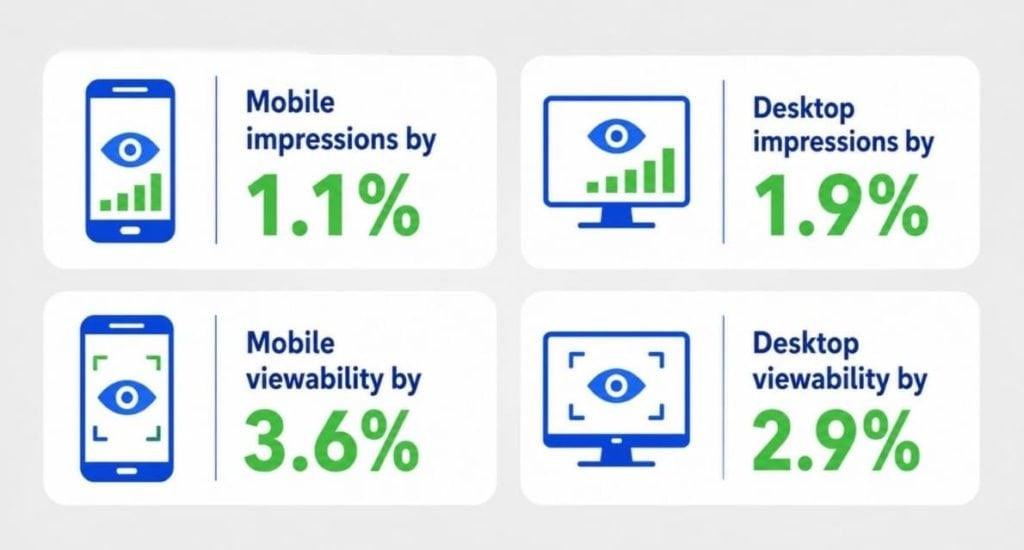
Google tested artificial delays across four billion ad impressions and found that adding just one second of delay reduced:
How Latency Kills Revenue Across the Ad Journey
Here’s how ad latency affects your programmatic revenue:
Slow Bid Responses Reduce Auction Competition
Header bidding creates value by allowing multiple demand sources to compete. However, bidders that respond after the timeout are excluded, even when they might have submitted the highest bid.
Timeouts that are too short remove valuable competition. Timeouts that are too long delay the ad-server call and creative render. High-value partners need enough time to respond without allowing slow or low-value demand to delay every auction.
Late Ads Lose Viewability
An ad can win and still fail commercially if it appears too late.
Users do not wait for inventory to monetize. They scroll, tap, and leave. When a creative renders after its slot has moved out of view, the publisher may record a low-viewability impression or no useful impression at all.
Google’s publisher guidance identifies creative latency as a major cause of poor ad performance. It also notes that properly implemented lazy loading can reduce latency and improve viewability.
Slow Pages Reduce Monetizable Sessions
There are many reasons behind slow working of entire page:
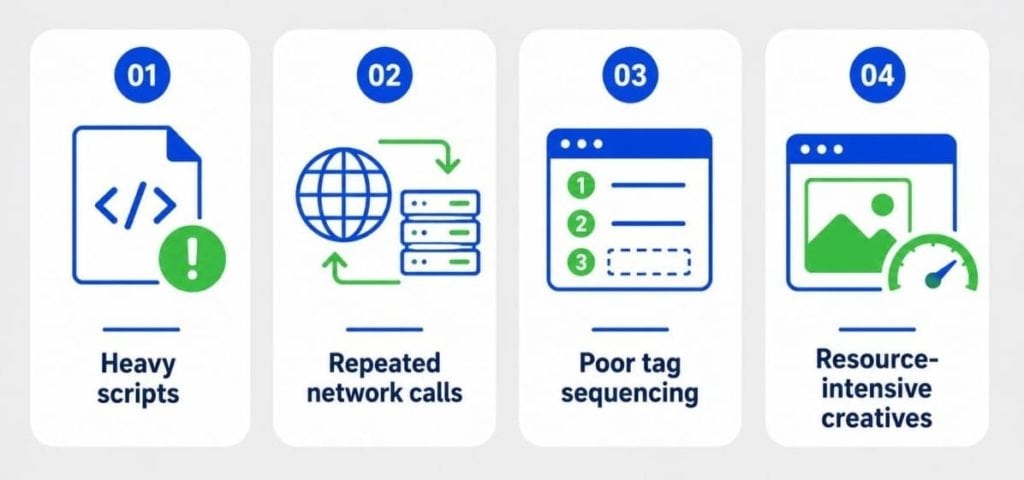
This can reduce content consumption, pages per session, and return visits. You may increase the value of one impression while unknowingly reducing the total impressions generated by each visitor.
Google’s Core Web Vitals measure real-world loading performance, interactivity, and visual stability. These signals matter because page experience and monetization capacity are closely connected.
Latency Distorts Optimization Decisions
A bidder may submit strong bids but participate infrequently because it times out on mobile. A placement may appear to have weak demand when requests are triggered too late. A format may show a high CPM while reducing session revenue through poor performance.
Optimizing only around CPM, win rate, or fill rate can reward the wrong part of the stack. Latency analysis shows whether value arrives quickly enough to be usable.
Where Ad Latency Usually Enters the Stack
Now let’s understand where can ad latency hide in your stack:
| Source | What happens | Hidden impact |
| Consent and identity calls | Auctions wait for signals | Delayed requests |
| Header bidding wrapper | Excess adapters increase browser work | Longer auctions |
| Demand partners | Responses arrive late | Missed bids |
| Ad server | Complex decision paths delay selection | Slower delivery |
| Creative delivery | Heavy files and trackers slow rendering | Lower viewability |
| Third-party scripts | Tools compete for browser resources | Shorter sessions |
| Poor lazy loading | Ads load too early or too late | Wasted opportunities |
These delays compound. Fixing one step will not solve the problem if another continues to block rendering.
The latency challenge is becoming harder as web pages grow heavier. The 2025 Web Almanac found that the median mobile page had reached approximately 2.6 MB, an 8.4% year-over-year increase. Over ten years, median mobile page weight increased by more than 200%, placing greater pressure on browsers, networks, and ad-delivery workflows.
How to Detect Latency Before Revenue Drops
Do not rely on one site-speed score. Connect technical timing with monetization outcomes.
You should start with tracking:
- Auction duration
- Bidder response time
- Timeout rate
- Ad-server timing
- Creative render time
- Viewability
- Fill rate
- Page RPM
- Revenue per session
- Pages per session
Afterwards, segment data by:
- Device
- Geography
- Browser
- Page template
- Ad unit
- Viewport position
- Demand partner
- Creative type
A site-wide average may look healthy while users on slower mobile connections experience severe delays.
You can take 1,000 milliseconds or less as a starting point for the internal auction timeout, but you should test against your own traffic and demand mix rather than treating one setting as universal.
How to Build a Low-Latency Monetization Strategy
In this section, you will understand how to build a low-latency monetization strategy.
Establish a Revenue-Weighted Baseline
Measure the delay each partner or integration adds against its incremental revenue. A partner adding time and meaningful revenue may be valuable. One adding the same delay with few wins may not be.
Tune Timeouts Using Real Conditions
Test settings across devices, markets, and connection types. Compare bidder participation, RPM, viewability, and revenue per session. The best timeout is where extra waiting stops producing enough additional value.
Remove Unproductive Demand Paths
More partners do not automatically create more revenue. Review sources that rarely bid, rarely win, bid below competitive levels, or respond inconsistently.
Every partner should justify the time, code, requests, and operational complexity it adds to the auction.
Use Smarter Loading Logic
Load important above-the-fold inventory early, but avoid requesting every below-the-fold slot immediately.
Trigger ads shortly before they are likely to become viewable. Loading too early wastes requests and browser resources. Loading too late causes missed viewable opportunities.
Control Creative Weight
Audit creative file size, video initialization, redirects, third-party tracking, and verification tags.
A high-paying creative is not truly valuable if it slows the page, appears after the user has scrolled away, or weakens the rest of the session.
Publishers should also identify campaigns and creative providers that repeatedly cause poor render performance instead of treating every slow impression as a site-level problem.
Reduce Browser-Side Work
Remove duplicate scripts, unused modules, unnecessary adapters, and tools that perform overlapping functions.
Sequence non-critical technologies after essential content and monetization events. A cleaner execution path gives both the page and the auction a better chance of completing on time.
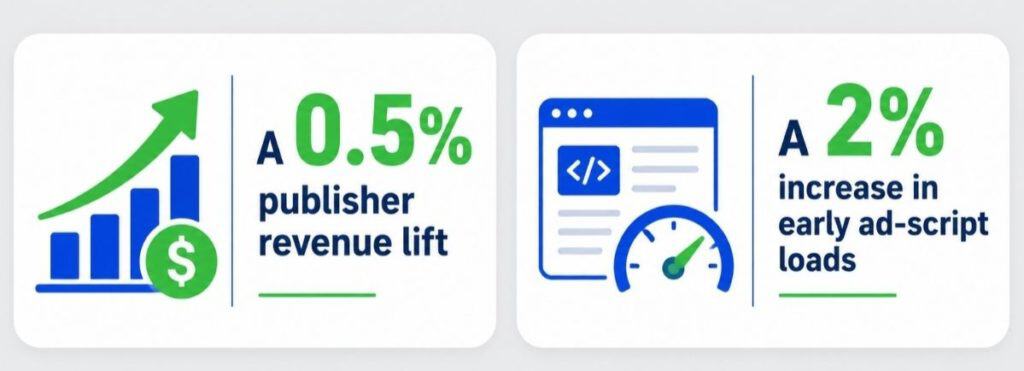
Even relatively small technical improvements can create measurable financial gains. Google reported that improving the loading performance of its publisher ad script by using a more efficient caching method led to:
Test Server-Side Paths Selectively
Moving some auction work away from the browser may reduce client-side load, but it can also affect match rates, transparency, and demand behaviour.
Judge server-side changes by their effect on net Programmatic Revenue, bid participation, viewability, and user experience—not by architecture alone.
Low Latency Is an Operating Discipline
Ad stacks change constantly. Partners are added, creatives become heavier, consent requirements evolve, new scripts are deployed, and traffic shifts across devices and geographies.
Low latency cannot be fixed once and forgotten.
Publishers need performance budgets, partner benchmarks, automated alerts, routine tag audits, and shared ownership across AdOps, engineering, product, and revenue teams.
Every new integration should answer two questions:
- What incremental value does it add?
- How much time and complexity does it introduce?
A monetization stack should ultimately be judged by the revenue it successfully renders—not by the number of technologies connected to it.
In The End: Protect the Revenue You Already Earned the Right to Win
Latency rarely causes a dramatic outage. It quietly reduces the number of auctions completed, bids considered, ads viewed, and pages consumed.
The solution is not chasing the lowest possible load time. It is building a cleaner, data-led monetization system where demand quality, auction timing, ad delivery, and user experience work together.
Auxo Ads helps publishers uncover revenue leakage, streamline complex monetization setups, improve auction efficiency, and connect inventory with premium demand through enterprise-grade ad management and leading programmatic marketplaces.
Ready to discover what a few hundred milliseconds may be costing you?
Visit Auxo Ads and start building a faster, more efficient, and scalable monetization strategy.
Frequently Asked Questions
- What is ad latency?
Ad latency is the delay between an ad opportunity becoming available and the ad rendering for the user. It includes auction time, bidder response, ad-server decisioning, creative retrieval, verification, and browser rendering.
- How does latency affect Programmatic Revenue?
Latency can reduce bidder participation, delay rendering, lower viewability, increase user exits, and reduce pages per session. Together, these effects decrease the number and quality of monetized impressions.
- Does low latency always increase revenue?
Not automatically. A timeout that is too short can exclude valuable bidders. Publishers need the fastest setup that still allows meaningful demand competition.
- Can adding more demand partners reduce revenue?
Yes. Additional partners add scripts, requests, and processing. If their incremental bids do not compensate for the added delay, overall revenue and user experience can decline.
- How often should publishers audit ad latency?
Publishers should monitor key metrics continuously and conduct deeper audits after integration changes, site redesigns, traffic shifts, or unexplained changes in RPM, fill rate, viewability, or session depth.






This site really knows how to make newcomers feel welcome from day one. The slot tournaments are super entertaining and I actually won a bonus credit last weekend which kept me playing for days. Local payment options make funding my account a breeze and withdrawals are surprisingly fast. Definitely my favorite spot for evening gaming. ph55bmw
As someone who loves Asian themed slots and quick pokies, this platform checked every box for me. The interface feels modern and I love how easy it is to filter games by provider or popularity. Bonuses are generous without impossible wagering requirements. I also noticed they host weekly tournaments that actually give regular players a fair chance. It has quickly become my go to spot for weekend fun. qq88asiaslot
Every time I log in I feel like I am stepping into a premium lounge rather than just another gaming site. The live dealer tables are incredibly professional and the chat feature makes it super social. Truly a top tier experience. god55vip
I jumped on goexchange9 a couple of weeks ago and the exchange features are incredibly straightforward. I appreciate how transparent the odds are displayed and how quickly the platform settles my bets. It feels like they designed everything with everyday users in mind rather than just high rollers. Really solid experience so far and I will definitely keep coming back. goexchange9
Fair rolls and honest mechanics are what keep me logging in every evening. I love how transparent the wagering requirements are and I never feel pressured to spend more than I planned. Relax, enjoy the spin, and let the wins come naturally. Start your journey at apuestasgana.
I have tested plenty of betting sites but this one keeps me coming back every single week. The mobile experience is flawless and I never have to wait long for my winnings to clear. They even send helpful tips for newcomers which shows they actually care about player success. It feels like having a reliable partner rather than just another random app on my phone. Explore idinterwin and join a community that plays fair and has fun.
[6181]nnok Official Login | সেরা অনলাইন ক্যাসিনো এবং বিকাশ পেমেন্ট সাইট,nnok-এ দ্রুত লগইন করে সেরা স্লট গেম খেলার নিয়ম জানুন এবং বিকাশ পেমেন্টের মাধ্যমে সহজ লেনদেনের অভিজ্ঞতা নিন। আজই অ্যাপটি ডাউনলোড করে শুরু করুন। visit: nnok
I’ve been looking for a reliable platform and this one really delivers. The games are smooth and the payouts are fast. Definitely check out brbet777bet if you want a great experience.
Great vibes and even better wins! I had a lucky streak last night and the withdrawal was processed almost instantly. Visit dtg288 for some real action.
Stumbled upon this platform and decided to stick around. The registration process is quick and the game library keeps getting better. Solid choice for anyone looking for reliable daily play. idgoto77
Solid platform with a very professional layout. I feel safe depositing my funds here because everything looks legit and secure. I trust kv88 for my daily plays.
Great platform with very fair odds. I appreciate the transparency and the quick customer support. krikia11 is a winner.
[8763]takaba লগইন ও অ্যাপ ডাউনলোড | বিকাশ দিয়ে ক্যাসিনো গেম খেলুন,takaba অ্যাপ ডাউনলোড করে লাইভ ক্যাসিনো বোনাস অফার বুঝে নিন। বিকাশ দিয়ে ক্যাসিনো গেম খেলুন এবং অনলাইন স্লট গেম ট্রিকস জানুন। আজই জয়েন করুন। visit: takaba
Great selection of games and the VIP perks are actually worth it. I feel like a valued player here. Make sure to check out vnokvip68.
The app version is a game changer. I can play anywhere and it doesn’t crash. If you prefer mobile gaming, ok777betapp is the way to go.
Such a colorful and exciting app. I was surprised by how easy it is to win small prizes early on. Give joya9gemsapp a try if you enjoy gem themed games.
Super happy with the rewards program here. It really keeps things exciting and gives you more value for your time. phbet100com is the real deal.
I love how straightforward the process is. No unnecessary pop-ups or annoying redirects. Just a clean entry point at selalubetlogin.
Super impressed with the payouts here. Everything is transparent and the customer service is actually helpful. Highly recommend phjilione to everyone!
[9393]zj3979 | Link vào tải app và cách chơi baccarat online,Truy cập zj3979 để trải nghiệm sảnh game uy tín. Hướng dẫn nạp tiền casino qua Momo nhanh chóng và chia sẻ mẹo quay hũ nổ hũ dễ thắng. Đăng ký tham gia ngay! visit: zj3979
I’ve tried a few sites lately but this one really stands out for its speed. The interface is super smooth and the rewards are legit. Definitely checking out phjl16com more often!
The sports betting options here are top notch. The odds are competitive and the live updates are spot on. idjasabola is my new favorite for match days.
A very professional platform with a lot of great options. I feel safe depositing my money here. phgrandpashabet
Love the vibe of this site! It is very user friendly and the games load quickly on my phone. bigbunnylogin makes gaming so much easier.
Top notch service and very responsive pages. I appreciate the transparency and the fair play rules here. Big thanks to idarena39.
The registration process took me less than two minutes. I am impressed with how streamlined everything is here. idarea188 is definitely a keeper.
I felt the luck the moment I signed up. The promotions are generous and lucky97 is definitely my new favorite spot.
Finally a platform that doesn’t lag during peak hours. The login process is quick and the graphics are top notch. Glad I found planet88login
Finally found a site that actually delivers on its bonuses. The game variety is insane and the mobile version works like a charm. Highly recommend 18jilicasino to everyone.
Fast access and a great collection of games. I spend a lot of my free time here because it is just so addictive. Check out senopati4login.
Logging in is a breeze and the account verification was surprisingly quick. I really appreciate the efficiency of lotusdewalogin.
Finally a platform that feels fair and transparent with the odds. I’m sticking with ph777php for a long time.
[4034]cv999 লগইন ও অ্যাপ ডাউনলোড | বিকাশ ক্যাসিনো ডিপোজিট,cv999 লগইন করে অনলাইন স্লট গেম খেলার নিয়ম জানুন এবং লাইভ ক্যাসিনো বোনাস অফার বুঝে নিন। আজই অ্যাপ ডাউনলোড করে গেম শুরু করুন। visit: cv999
If you are looking for a reliable spot with good odds, this is it. I’ve had a few decent wins already. caricuanslot is definitely my new go-to place.
Super impressed with the VIP treatment here. The bonus rounds are exciting and I feel like a winner every time I log in to krkrvipkrvip125
The bonuses here are actually legit and easy to claim. I’ve had some great wins this week alone. Definitely visit paldopanalomaya
Really impressed with the payout speed here. It is definitely one of the most reliable platforms I have used lately. Highly recommend bdtakbat to everyone.
[5512]Mr Lucky Login – Slot Online E-wallet Malaysia Trusted,Sertai mr lucky untuk akses mr lucky login yang pantas. Nikmati slot online e-wallet malaysia dan casino live dealer trusted. Jom daftar sekarang! visit: mr lucky
Love the variety of slot games available here. I hit a decent jackpot last night and the withdrawal was seamless. mamajituslot is the real deal.
Really impressed with the game variety on this platform. Everything runs smoothly on my phone without any lag. Check out ph55bmwcom if you want a solid experience.