
A low RPM (Revenue Per Mille) is a hidden sign of danger. It can quietly drain your revenue even when traffic looks healthy. You might feel delighted seeing thousands or even millions of page views. But is your RPM not so good? Then it means that your site is not converting audience attention into ad revenue efficiently.
Don’t mistake RPM for a mere dashboard metric. It is a monetization health signal. How? We’ll discuss later in the blog.
In this blog, we’ll break down the Revenue Per Mille meaning and its formula. Additionally, we’ll understand why publishers experience low RPM and how to fix it using practical ad revenue optimization strategies.
What Is RPM (Revenue Per Mille)?
The Revenue Per Mille definition is simple:
It measures how much estimated revenue a publisher earns for every 1,000 impressions, page views, or sessions, depending on the RPM type being measured.
The word “mille” means thousand. So, the Revenue Per Mille meaning is essentially “revenue per thousand.”
Google AdSense defines RPM as estimated earnings divided by the number of page views, impressions, or queries, multiplied by 1,000. In simple terms, it helps publishers understand how much revenue they are generating from every 1,000 monetized opportunities.
RPM is useful because traffic volume alone does not tell the full revenue story. A site with 500,000 monthly page views and poor monetization may earn less than a niche publisher with 150,000 highly valuable page views and a stronger ad setup.
How to Calculate RPM?
The standard Revenue Per Mille formula is:
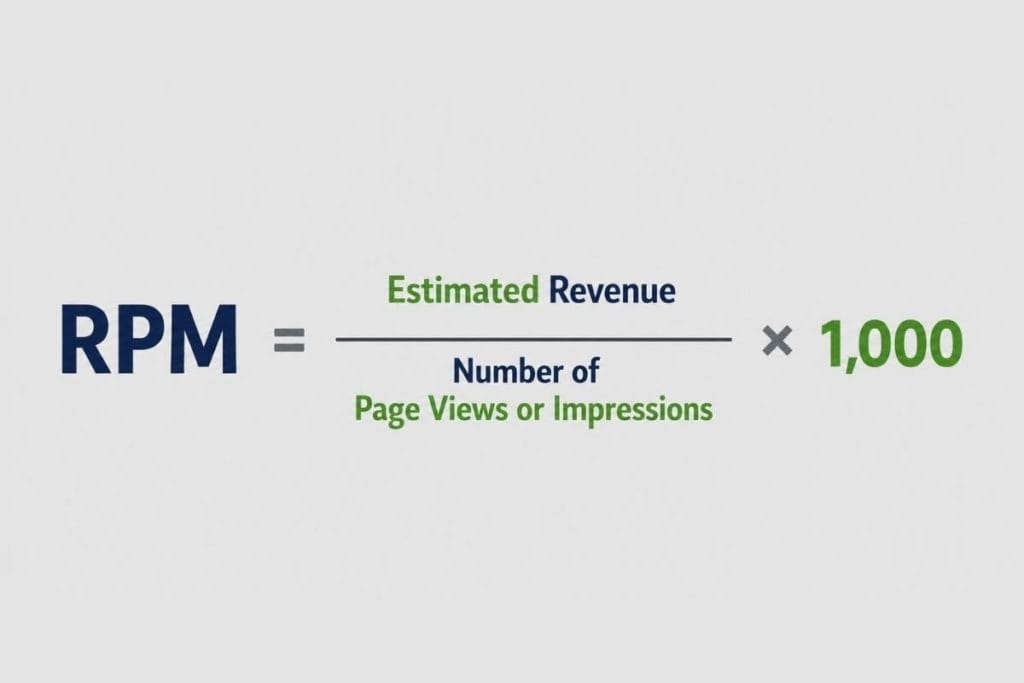
For example:
If a publisher earns $250 from 100,000 page views, the page RPM would be:
$250 / 100,000 × 1,000 = $2.50 RPM
This means the publisher earns $2.50 for every 1,000 page views.
However, publishers should be clear about which RPM they are tracking. RPM can be calculated using page views, ad impressions, ad requests, or sessions. Each version tells a different story. The table below breaks down the key types of RPM publishers that should be monitored.
Key Types of RPM in Publisher Monetization
| RPM Type | What It Measures | Formula | Why Publishers Should Track It |
| Page RPM | Revenue earned per 1,000 page views. | Page RPM = Total Revenue / Total Page Views × 1,000 | Helps compare monetization performance across articles, categories, authors, devices, and traffic sources. It is especially useful for understanding which pages or content sections generate the most revenue. |
| Impression RPM | Revenue earned per 1,000 ad impressions. | Impression RPM = Total Revenue / Total Ad Impressions × 1,000 | Shows how efficiently actual ad impressions are being monetized. Publishers can use it to compare ad units, formats, placements, and demand partners. |
| Ad Request RPM | Revenue earned per 1,000 ad requests. | Ad Request RPM = Total Revenue / Total Ad Requests × 1,000 | Helps identify whether ad requests are turning into revenue efficiently. It is closely connected to ad fill rate, demand quality, and auction performance. |
| AdSense RPM | Estimated revenue shown inside Google AdSense reporting, usually based on page views, impressions, or ad requests depending on the selected report view. | AdSense RPM = Estimated Earnings / Page Views, Impressions, or Ad Requests × 1,000 | Useful for comparing performance across AdSense channels, pages, ad units, and inventory types. It is an estimated performance metric, not the exact amount earned. |
| Session RPM | Revenue earned per 1,000 user sessions. | Session RPM = Total Revenue / Total Sessions × 1,000 | Helps evaluate audience quality. A visitor who reads multiple pages in one session may generate more value than a visitor who lands on one page and exits immediately. |
You can also break RPM down further by geography, device, user type, and content category. These advanced RPM views help identify which audiences, traffic sources, and content segments are driving the strongest monetization performance.
RPM vs CPM: What’s the Difference?
People often confuse RPM and CPM, but they are not the same. Here’s another tabular breakdown for your better clarity.
| Metric | Used By | Meaning |
| CPM | Advertisers | CPM, or Cost Per Mille, is the amount advertisers pay for every 1,000 ad impressions. It helps advertisers understand the cost of reaching a thousand users through display, video, or programmatic ads. |
| RPM | Publishers | Revenue earned per 1,000 impressions, page views, or sessions |
Remember: A high CPM does not always guarantee a high RPM.
Why Is Your RPM Low?
A low RPM rarely has one single cause. It is usually the result of several monetization leaks across demand, inventory, user experience, and traffic quality. Here are the most common reasons publishers see low RPM.
Weak Ad Fill Rate
Ad fill rate measures how many ad requests successfully receive an ad.
Formula:
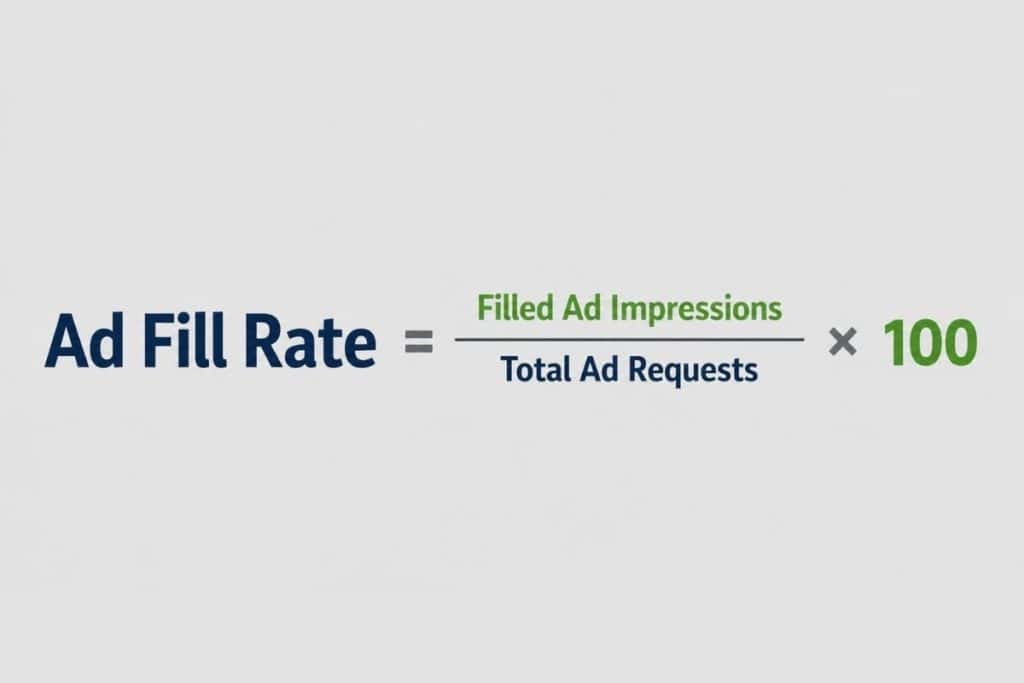
A publisher may have high traffic and many ad requests, but if a large percentage of those requests remain unfilled, RPM drops.
Low fill rate can happen because of weak demand, poor floor pricing and limited geographies. Technical setup issues, blocked categories, consent restrictions, or latency problems in the ad stack can also be the reason.
How to Fix It
Publishers should regularly audit unfilled impressions by geography, device, ad unit, browser, and demand source. A good monetization setup should bring multiple demand partners into competition while maintaining fast auction performance.
Improving fill rate does not mean accepting every low-quality bid. The goal is to increase healthy competition while protecting inventory value.
Low Ad Viewability
Ad viewability is one of the biggest drivers of RPM.
If ads load but users never actually see them, advertisers are less likely to bid aggressively. Over time, low viewability can reduce demand quality and lower CPMs, which eventually pulls down RPM.
Common causes of low ad viewability include:
- Ads placed too far below the fold
- Slow-loading ad units
- Poor mobile layouts
- Excessive layout shifts
- Users bouncing before ads render
- Heavy pages with delayed ad calls
How to Fix It
Place high-value ad units where users naturally engage, not where they create friction. Use lazy loading carefully, improve Core Web Vitals, reduce unnecessary scripts, and monitor viewability by ad unit.
A viewable ad impression is more valuable than an ad slot that technically loads but never enters the user’s screen.
Poor Header Bidding Setup
Header bidding allows multiple demand partners to bid on publisher inventory before the ad server makes a final decision. When done well, it increases competition and helps publishers achieve better yield.
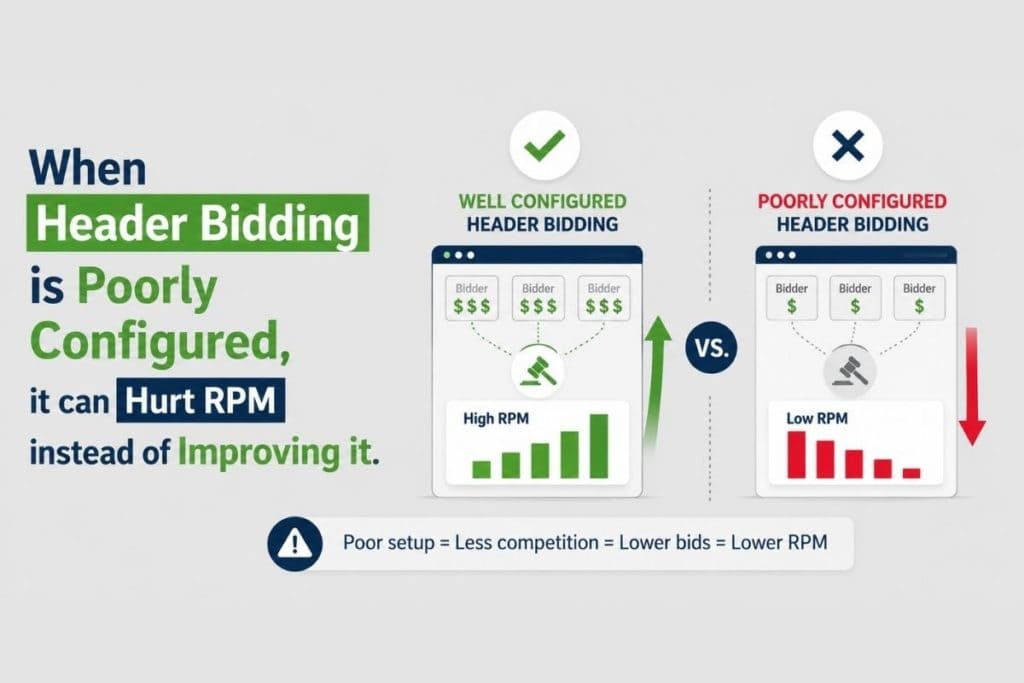
Problems may include:
- Too many bidders slowing down the page
- Timeout settings that are too short or too long
- Weak demand partner selection
- Poor floor price logic
- Duplicate demand causing inefficient auctions
- Lack of reporting transparency
How to Fix It
Publishers should treat header bidding as an ongoing optimization process, not a one-time setup. Review bidder performance, win rates, timeout behavior, latency, bid density, and net revenue contribution.
The best setup is not always the one with the most partners. It is the one with the right partners, clean auction logic, strong reporting, and consistent demand pressure.
Inefficient Programmatic Advertising Stack
Programmatic advertising can unlock strong revenue, but only if the full stack is managed properly.
Many publishers lose revenue because their programmatic setup is fragmented. They may have multiple platforms, disconnected reporting, outdated price floors, inconsistent ad unit rules, and limited visibility into which demand sources are actually driving revenue.
How to Fix It
A stronger programmatic setup should include:
- Unified auction management
- Clean ad unit structure
- Premium demand access
- Strong marketplace relationships
- Transparent reporting
- Smart floor pricing
- Brand safety controls
- Continuous yield testing
Publishers should also avoid relying too heavily on a single demand channel. A diversified demand strategy helps reduce revenue volatility and improve auction competitiveness.
Incorrect Floor Pricing
Floor prices help publishers set the minimum bid required for an ad impression. But bad floor pricing can damage RPM.
If floors are too high, the fill rate drops. If floors are too low, advertisers buy premium inventory too cheaply.
Both situations can lead to low RPM.
How to Fix It
Use dynamic floor pricing based on:
- Geography
- Device type
- Ad placement
- Viewability
- Audience segment
- Content category
- Seasonality
- Historical bid behavior
Publishers should test floor prices gradually instead of making aggressive changes across the entire site. The goal is to find the balance between CPM, fill rate, and total revenue.
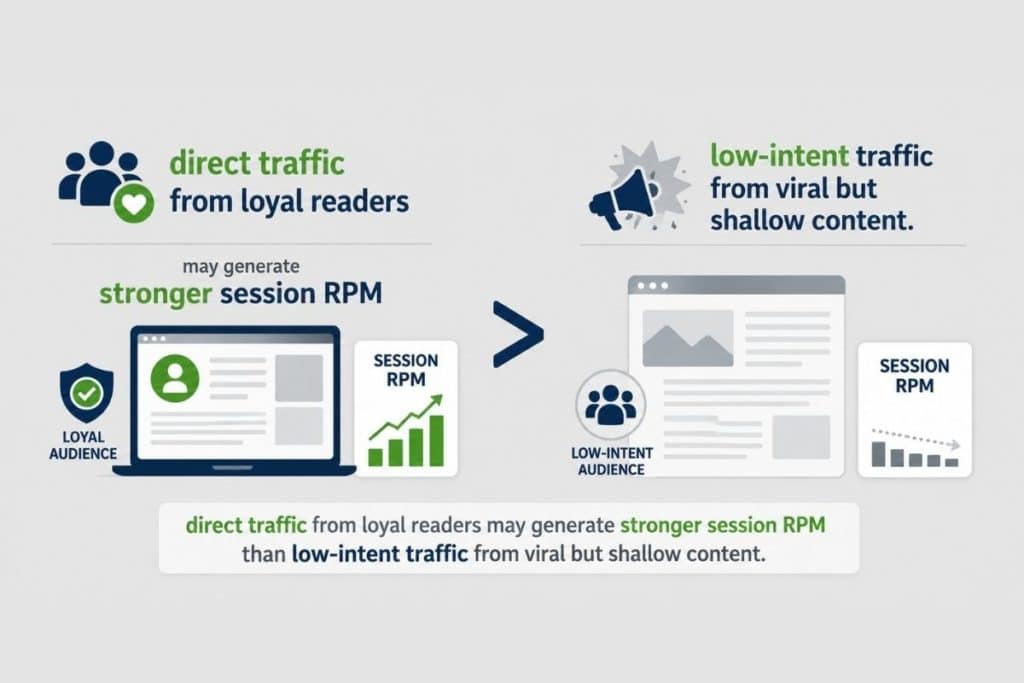
Weak Traffic Quality
Not all traffic monetizes equally.
A publisher may have growing traffic but declining RPM if the traffic comes from low-value geographies, poor referral sources, bots, accidental clicks, low-engagement social traffic, or pages with high bounce rates.
For example:
How to Fix It
Segment RPM by traffic source. Compare organic search, direct, referral, paid social, newsletters, Discover, and social platforms.
Look at:
- Pages per session
- Bounce rate
- Time on page
- Scroll depth
- Geography
- Device type
- Revenue per session
- Ad engagement
- Invalid traffic signals
Publishers should not only ask, “How much traffic did we get?” They should ask, “Which traffic actually monetized?”
Poor Content Monetization Strategy
Content affects RPM more than many publishers realize.
Advertisers value certain audiences and contexts more than others. Content around finance, B2B, technology, insurance, software, health, education, and purchase-intent topics often attracts stronger advertiser demand than broad, low-intent content.
That does not mean every publisher should chase high-CPC niches unnaturally. But it does mean content planning should include monetization intelligence.
How to Fix It
Identify your highest RPM content categories and build more topic clusters around them.
Look for pages with:
- High RPM
- Strong organic traffic
- High engagement
- Good viewability
- Low bounce rate
- Strong advertiser relevance
Then create supporting content that strengthens topical authority and increases internal page depth. This improves both SEO and publisher monetization.
Bad Ad Placement and Layout
Ad placement can make or break page RPM.
Too few ads can limit revenue. Too many ads can hurt user experience, increase bounce rate, reduce viewability, slow down pages, and damage long-term monetization.
The goal is not to place more ads everywhere. The goal is to place the right ad formats in the right positions.
How to Fix It
Publishers should test:
- Above-the-fold placements
- In-content ads
- Sticky units
- Sidebar ads
- Anchor ads
- Native placements
- Video units
- Refresh rules
- Mobile-specific layouts
Every ad placement should be evaluated by revenue, viewability, latency, engagement, and user experience impact. A layout that increases short-term revenue but damages retention can reduce long-term RPM.
Slow Page Speed and Heavy Scripts
Ad revenue optimization is closely tied to site performance.
Slow pages reduce engagement, increase bounce rates, delay ad rendering, lower viewability, and weaken auction performance. Heavy scripts can also interfere with header bidding and programmatic auctions.
How to Fix It
Publishers should regularly audit:
- JavaScript load time
- Ad script weight
- Third-party tags
- Lazy loading behavior
- Core Web Vitals
- Mobile speed
- Consent management delays
- Ad rendering time
A faster site creates more viewable impressions, better user engagement, and stronger revenue opportunities.
Seasonality and Market Demand Changes
Sometimes RPM drops even when nothing is technically wrong. Advertiser demand changes throughout the year.
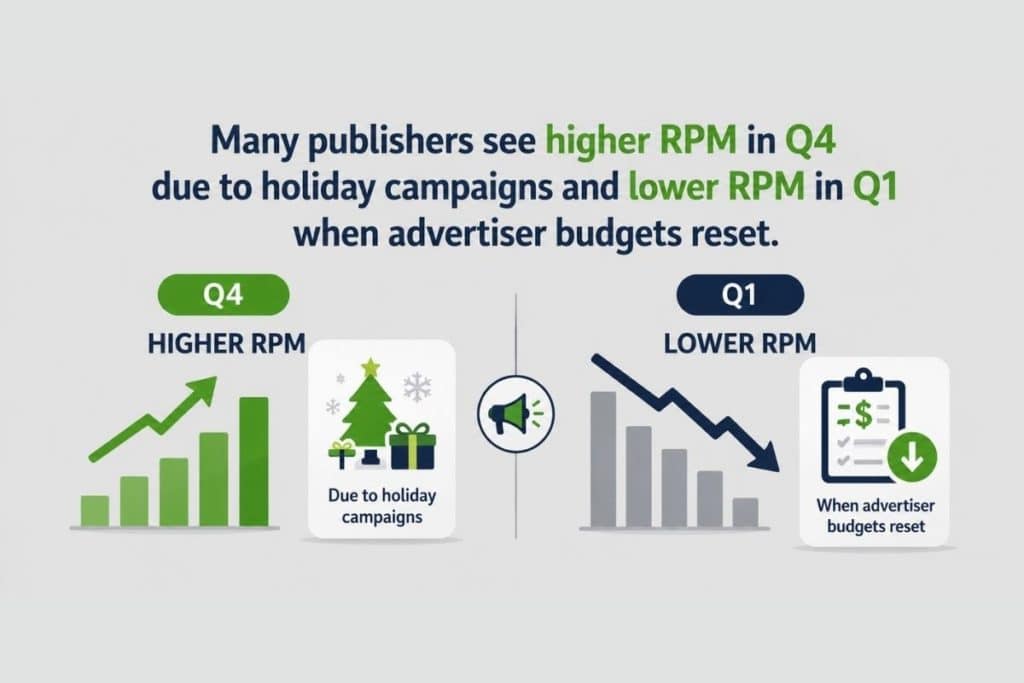
Industry trends, economic conditions, privacy changes, and campaign cycles can also affect programmatic demand.
How to Fix It
Publishers should compare RPM year over year, not just week over week. A January RPM drop may be normal, while a sudden drop in the middle of a strong demand period may indicate a technical or demand issue.
Build dashboards that separate normal seasonality from real monetization problems.
How Publishers Can Increase RPM Without Hurting User Experience
To increase RPM, publishers need a balanced monetization strategy.
Higher RPM should not come at the cost of user trust. Flooding pages with ads may increase revenue temporarily, but it can reduce engagement, hurt SEO, lower viewability, and push users away.
The better approach is to improve the value of each impression.
Publishers can do this by:
- Improving auction competition
- Increasing viewable impressions
- Optimizing ad formats
- Reducing latency
- Improving content quality
- Building loyal audiences
- Segmenting inventory intelligently
- Using premium demand channels
- Testing layouts continuously
- Monitoring revenue per session, not just page RPM
Sustainable RPM growth comes from better monetization architecture, not just more ad slots.
Why Low RPM Requires Both Technology and Strategy
Low RPM is not only a technical problem. It is a business problem.
You need the right ad server setup, demand relationships, reporting layer, auction strategy, and content monetization approach. But you also need human expertise to interpret the data and make the right trade-offs.
For example:
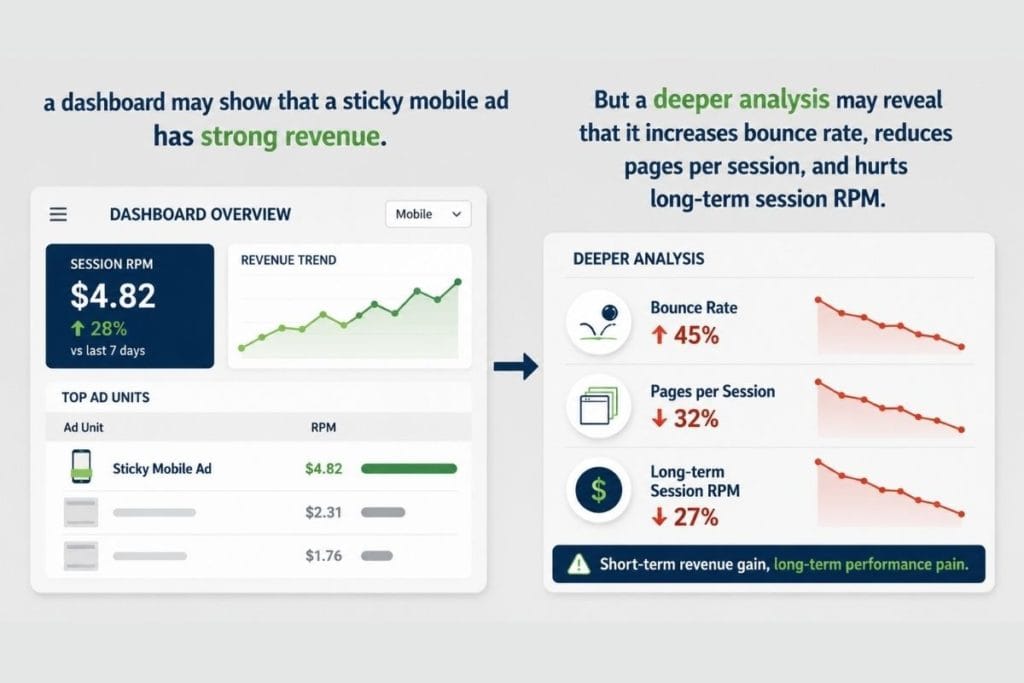
a dashboard may show that a sticky mobile ad has strong revenue. But a deeper analysis may reveal that it increases bounce rate, reduces pages per session, and hurts long-term session RPM.
That is why publishers need more than basic reporting. They need actionable monetization intelligence.
How Auxo Ads Can Help Turn Low RPM Into Revenue Growth?
Fixing low RPM takes more than changing one ad placement or adding another demand partner. It requires a connected monetization strategy built around premium demand, advanced ad operations, smart yield management, and continuous revenue optimization.
Auxo Ads helps publishers improve ad revenue performance with a stronger monetization setup, advanced programmatic expertise, premium demand access, and hands-on optimization across key revenue channels.
Whether you want to improve page RPM, strengthen fill rate, optimize header bidding, increase ad viewability, or build a more reliable publisher monetization strategy, Auxo Ads can help you identify what is holding your revenue back and fix it with a data-led approach.
Ready to fix low RPM and unlock stronger ad revenue?
Visit Auxo Ads and discover how your publishing business can monetize smarter.
Keep Learning With Auxo Ads
Want more publisher monetization tips, AdTech insights, and practical guides on programmatic advertising, ad revenue optimization, RPM growth, and yield strategy?
Visit the Auxo Ads blog and subscribe to the newsletter; your next revenue breakthrough could be one insight away.







Finally found a site that does not crash during peak hours. The loading time on phss7777 is impressively fast.
Finally found a site that actually works without any glitches. Setting up my account was a breeze and I am already seeing great results with ku9iappapk
[212]bigwin game Official Login | Pinakamabilis na GCash Cashout,Mag-register sa bigwin game para sa mabilis na GCash cashout. I-download ang APK at alamin ang mga tips sa online slots para manalo. Sali na at maglaro ngayon! visit: bigwin game
Best experience I’ve had in a while. Everything is set up perfectly and the customer support team is very helpful and polite. 33jilicom
Best gaming site I have encountered in Asia this year. The customer support is top notch. Visit jljl7asia
Love how easy it is to navigate the site on my mobile. Everything loads instantly. Check out phjiliphplay for a seamless experience.
Fast deposits and even faster withdrawals. That is all I really care about and this site delivers. 1pra1bet is a winner in my book.
Honestly, the variety of games here is impressive. I spent the whole weekend exploring and didn’t get bored once. Great experience overall 55llcombet
If you love a classic casino feel with modern twists, this is it. The bonuses are actually generous. Give royal777game a try, you won’t regret it.
Honestly, the variety of games here is impressive. I spent the whole weekend exploring and didn’t get bored once. Great experience overall 55llcombet
For all you casino game lovers, juegosdecasinos is your go-to spot. Lots of games to choose from! Get your game on: juegosdecasinos